

Continuous Player Development. One growing record of every player.
GoFathom connects coach, player, and parent around a single, growing record of every player's journey, so coaching feedback lands and stays.

GoFathom is structured around five pillars, each addressing a specific gap in the coaching process:

Feedback
Coaches record via text, audio, video, or photo and, using Coach AI, instantly turn observations into actionable feedback shared through a searchable player timeline.
Explore feedback →
Reflection
Players capture their own reflections on performance and progress, giving coaches a more complete picture and driving more informed development action.
Explore reflection →
Wellbeing
Pre and post-session check-ins on sleep, mood, body state, and motivation give coaches whole-player visibility beyond on-pitch performance.
Explore wellbeing →
Engagement
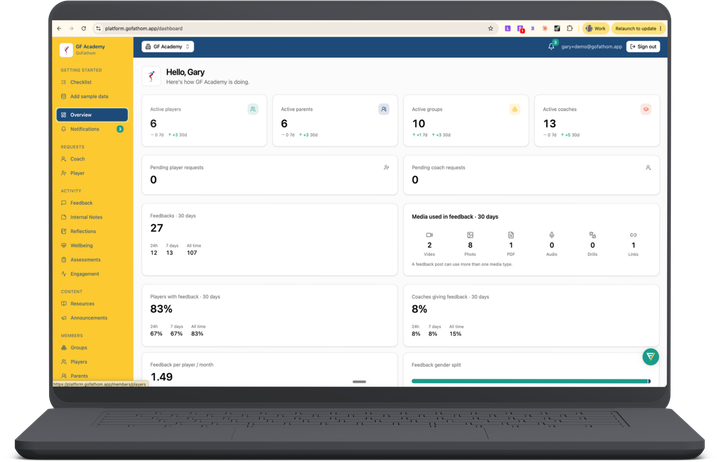
The Engagement Dashboard gives coaches a full view of platform activity, acting as an inbox that ensures every player who shares something receives a response.
Explore engagement →
Assessment
Coaches capture, store, and monitor performance data across all players in a centralised repository. Data captured becomes data used, tracking progress over time.
Explore assessment →Everything starts with the player.
GoFathom is built around one job: helping each player get better, and looking after them while they do. Every part of the app connects back to the person in the middle.
- DevelopmentHow the player is improving, and what they work on next.
- WellbeingPlayers check in on how they're feeling, so coaches spot problems early and progress never comes at the cost of the person.
Three things drive development.
Most of a player's progress lives in what gets said about it, and what they say about it themselves.
- FeedbackCoaches tell players what they saw and what to work on next.
- Internal notesA quick, easy way for coaches to jot down observations as they happen, ready to turn into feedback later.
- ReflectionsPlayers record their own view of training, matches and how they're getting on.
Link it together in a Personal Development Plan, if you want one.
The plan is optional. Use as much or as little of it as suits you. When you do, feedback, notes and reflections attach to it, so every comment has somewhere to go and progress shows over a season.
- TargetsWhat the player is working towards.
- HabitsThe routines that get them there.
- ProgressEverything said about the player, in one timeline.
More ways in, more insight into the person.
Around the plan, three more features keep players involved and tell coaches who they are dealing with.
- SurveysQuestionnaires that collect players' views.
- ProfileWho the player is: background, position, contacts and history.
- AssessmentsTests and measurements coaches record over time.
Add events, payments and communications.
Now the same system runs the organisation as well as developing its players.
- EventsSessions, fixtures and trials on one schedule.
- PaymentsFees and subscriptions handled in the app.
- CommunicationsMessages and announcements to players, parents and coaches, all in one place.
One system to run a sports organisation, built around developing players.
Admins run the club, coaches coach, and players and parents stay involved. Every part of it feeds back into the player at the centre.

And it runs the rest of your programme.
Events and fixtures
Calendar, facilities, opponents and repeating events.
Availability and team selection
Ask who's free, pick the team, publish it.
Payments
Charge families and take card payments through Stripe.
Forms, surveys and notices
One place to ask for anything.
The right interface for every role
Coaches, players, and parents use the GoFathom app on iOS and Android. Organisation administration happens in a coach-only web console.
Reasons to consider
GoFathom ensures coaching feedback lands and stays. It gives organisations the full picture of development, not just performance, so every player has the best chance of realising their potential.
Built with safeguarding at its core. All communication between coaches, players, and parents takes place within a structured, compliant, and managed channel, replacing personal messaging or informal contacts that exist outside the platform.
GoFathom is accessible across iOS and Android for coaches, players, and parents, with a coach-only web console for organisation administration. Each user accesses the platform through the interface appropriate to their role, on the device they already use.